 voxolith
Creatures
@voxolith/gen-creature: a rigged, animated voxel rat with a 26-bone rig, seven generated clips and a layered interior that damage exposes.
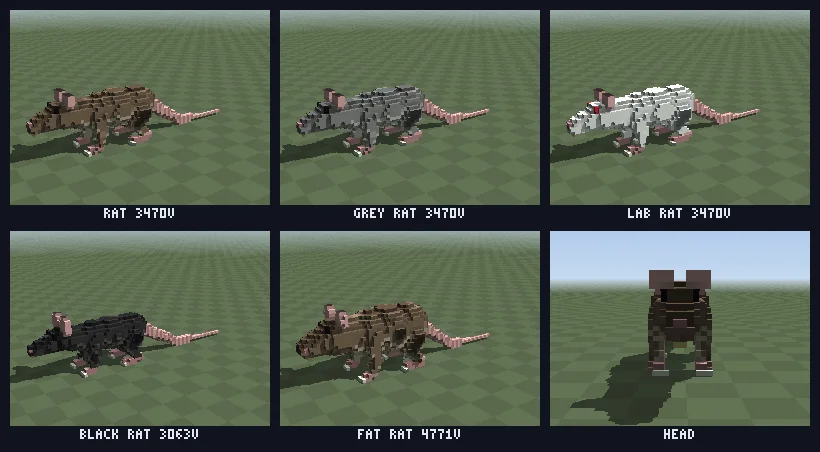
@voxolith/gen-creature makes rigged, animated creatures: a rat first, with other small quadrupeds
to follow from the same shape and different parameters. The entity is a rest-pose model whose voxels
each know their bone, a rig, and a set of generated clips. Play, blend and bake them with
@voxolith/engine/animation.
import { seededRandom } from "@voxolith/renderer/core";
import { generateCreature, PRESETS } from "@voxolith/gen-creature";
import { bakePose, makeAnimator, poseMatrices } from "@voxolith/engine/animation";

const { entity } = generateCreature(PRESETS.rat, seededRandom(1));
const anim = makeAnimator(entity, "walk");

// every frame:
anim.update(dt);
const posed = bakePose(entity.model, entity.rig!, poseMatrices(entity.rig!, anim.pose()), { yaw });
For many animated creatures, bake through the engine's pose cache and crowd rather than one
bakePose per frame each; see stamping and crowds.
Rig and clips
The rig has 26 bones: pelvis, spine, chest, neck, head, two ears, a seven-bone tail, and upper,
lower and foot for each of the four legs (FL, FR, HL, HR, exported as LEGS). Each bone
rotates about its head; the model binds every voxel to one bone through model.bones.
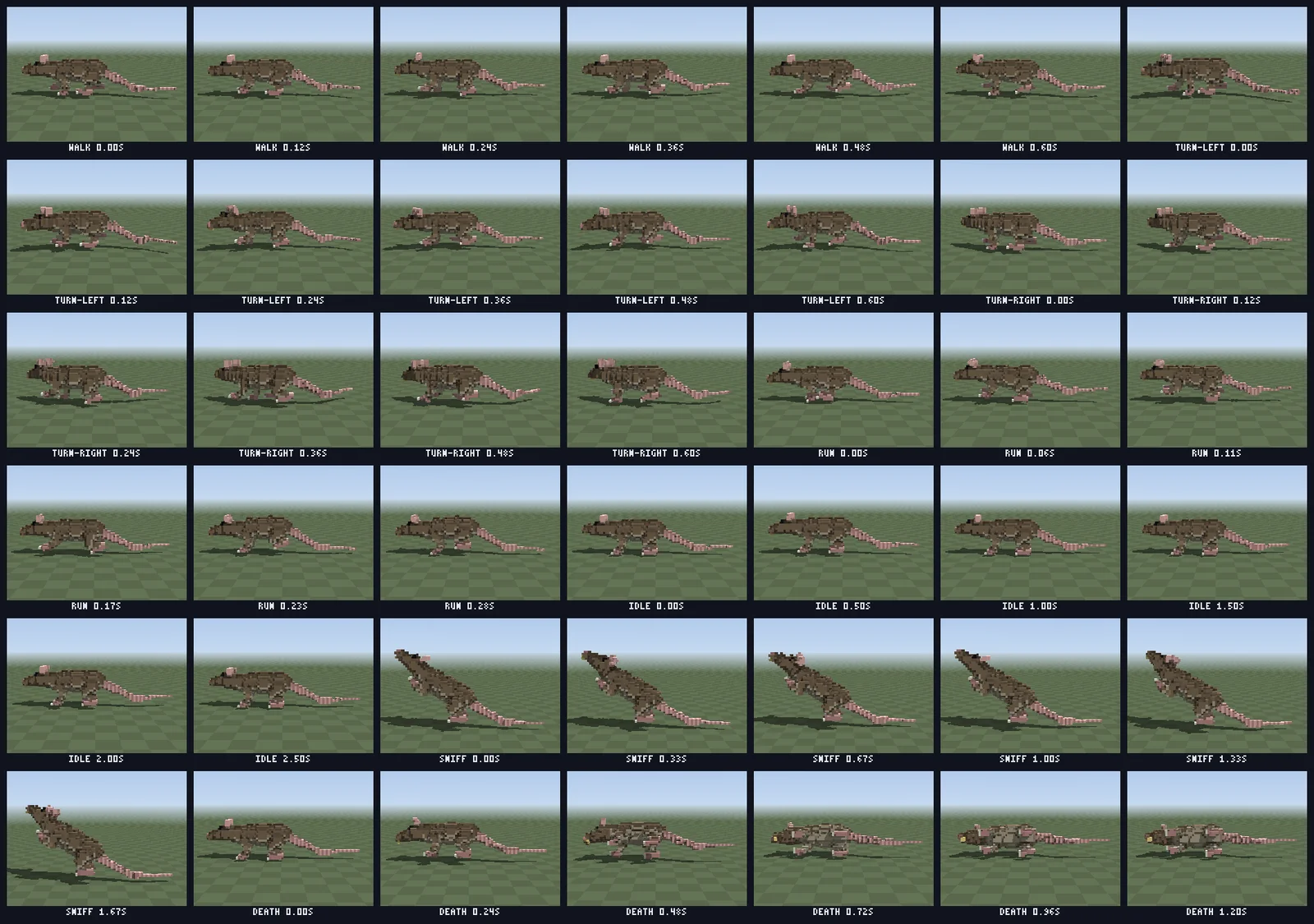
The clips are generated from the gait parameters (stride, pace, bounce, tailSway):
| clip | loop | notes |
|---|---|---|
walk | yes | legs in diagonal pairs, a small bob, a foot.<leg> event at each footfall |
turn-left, turn-right | yes | the walk with the spine, neck and head yawed into the turn and the tail swung out of it |
run | yes | a bounding gallop with the spine flexing; foot.front and foot.hind events |
idle | yes | 3 s of breathing, bursts of sniffing and an ear twitch |
sniff | yes | 2 s rearing up on the hind legs and looking around |
death | no | a roll onto the side, going limp |
Clips are keyed at 12 frames per second, like sprite animation: it suits voxels, where a limb only moves a whole voxel or so between keys anyway, and lets a host cache baked poses per frame. Loops repeat their first key at the end, so they close exactly. Rotations are quaternions relative to rest, about each bone's head, in its parent's frame; clips can also carry a root offset (a bob, a crouch) and named events.
Inside
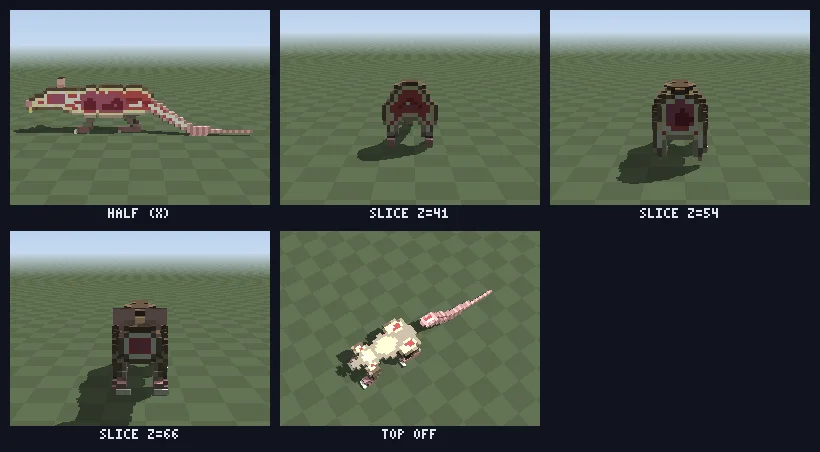
Under the fur there is fat, flesh and muscle by depth, a skeleton down the spine, legs and tail, a
skull around a brain, lungs and a heart in the chest and a gut in the belly. The body is built with
gen-kit's RiggedVolume: masses
are filled per bone, parents before children so each child owns its joint, then layerInterior
re-roles the mass by depth and bone cores and organs are stamped afterwards.
All of it is out of sight until wound carves the
model or sever takes a limb off. Both work on the rest
model, so damage follows the creature through every pose baked afterwards. When a pose uncovers flesh
that was buried at rest (under a swinging haunch), the rig's cover table, which maps each interior
role to fur, draws it as fur; bakePose uses it by default. Only damage ever shows the inside.
The 19 roles are the eleven visible on a whole animal (fur, dark and light fur, belly, skin, dark
skin, claw, eye, eye shine, nose, tooth) and eight inside (fat, flesh, muscle, bone, marrow, organ,
dark organ, blood), exported as INTERIOR. Eyes, organs and blood carry a glossy material hint.
Resolution rules
The proportions are chosen so the rat animates without losing the voxel look:
- nothing animated is thinner than 2 voxels, except the last third of the tail;
- at least 4 voxels between joints, so a 15 degree bend moves a limb end by a voxel;
- the detail budget goes to the head (eyes, ears, snout, incisors); the body stays simple masses;
- legs are longer than a real rat's (
legLength1.5): a real rat's legs hide under its belly, and a gait nobody can see does not read.
The default rat is about 3.5k voxels and 26 bones, and bakes a posed model in about 2 ms
(bun run --cwd generators/creature bench measures it).
Sizing for a world
The presets are stylised game rats: 75 voxels nose to tail tip at size 1.2, which is right beside
a 10 voxels-per-metre house, but a 75 cm rat in a 1 cm world. The creature has no finer scales:
it is authored near that resolution already. Instead,
atScale(params, voxelsPerMetre) sizes any
preset for a world with a fixed unit, keeping the presets' ratios to each other and snapping to the
0.05 grid of shape.size (never below 0.7):
import { atScale, generateCreature, PRESETS } from "@voxolith/gen-creature";

const rat = generateCreature(atScale(PRESETS.rat, 100), seededRandom(1)).entity;
// size 0.8: 49 voxels long, a large brown rat of about 50 cm
The floor of 0.7 keeps the legs two voxels thick, so below a certain scale atScale cannot give a
rat its real size and it comes out larger than life. For the default rat:
| voxels per metre | shape.size | nose to tail tip |
|---|---|---|
| 10 | 0.7 (held) | 43 voxels, about 4.3 m |
| 20 | 0.7 (held) | about 2.15 m |
| 50 | 0.7 (held) | about 0.86 m |
| 100 | 0.8 | 49 voxels, about 0.5 m: real size |
Two helpers share atScale's maths, so an app can decide without hard-coding a threshold.
realSizeAt(params, voxelsPerMetre)
says whether atScale needs no clamping there, and
minVoxelsPerMetre(params) is
the smallest scale where it holds: about 84.4 for the default rat, 88 for the fat rat.
realSizeAt is also false above about 253 voxels per metre, where the size is held at its upper
bound of 2 and the creature comes out smaller than life.
import { atScale, generateCreature, minVoxelsPerMetre, PRESETS, realSizeAt } from "@voxolith/gen-creature";

// Show rats only where they are true to size; otherwise say where they would be.
const kinds = ["rat", "grey rat", "black rat"] as const;
const rats = kinds.every((k) => realSizeAt(PRESETS[k], vpm))
  ? kinds.map((k, i) => generateCreature(atScale(PRESETS[k], vpm), seededRandom(seed + i), k).entity)
  : [];
if (!rats.length) console.log(`rats from ${Math.ceil(Math.max(...kinds.map((k) => minVoxelsPerMetre(PRESETS[k]))))} voxels per metre`);
The valley example does this: its rats appear only at 100 voxels per
metre, and at 20 or 50 the HUD says "rats at 1 cm". A game that wants giant rats (the
tutorial) just uses atScale and lets the floor win.
Small rats are where the resolution rules bite, so below size 1 the body keeps floors: lower legs and feet stay over 2 voxels across and the first part of the tail over 1.5; there is no fat layer; and bone and organs sit one voxel shallower, so a wound still shows them.
Presets
| preset | differs from rat |
|---|---|
rat | a brown rat with a pale belly |
grey rat | grey coat |
lab rat | white, red-eyed, barely mottled |
black rat | black, slimmer, longer tail, bigger ears |
fat rat | more girth, slower pace, more bounce |
Development
bun run --cwd generators/creature verify            # binding, hidden interior, chest slice, every clip in one piece, footfalls, damage
bun run --cwd generators/creature preview species   # also: cut, clips, walk, turns; --scale 100 for the real-size rat
bun run --cwd generators/creature bench             # pose and bake cost
verify runs every clip and damage check at both the preset size and the 100 voxels-per-metre size.
Creature
- Id
voxolith/creature- Version
- 0.2.0
- Scales
- 10 voxels per metre
Parameters
Shape
| Parameter | Path | Range | Default |
|---|---|---|---|
Size scales the whole creature, about 62 voxels nose to tail per unit; below about 0.7 legs thin under 2 voxels | shape.size | 0.7 to 2, step 0.05 | 1.2 |
Body length length of the torso as a multiple of the species' proportions | shape.bodyLength | 0.7 to 1.5, step 0.05 | 1 |
Girth body width and depth as a multiple; higher is a plumper creature | shape.girth | 0.7 to 1.5, step 0.05 | 1 |
Head length head length from neck to nose as a multiple | shape.headLength | 0.7 to 1.4, step 0.05 | 1 |
Snout taper how far the snout narrows to the nose: 0 blunt, 1 pointed | shape.snout | 0 to 1, step 0.05 | 0.6 |
Ears ear size as a multiple | shape.ears | 0.6 to 1.6, step 0.05 | 1 |
Leg length leg length as a multiple; longer legs carry the body higher off the ground | shape.legLength | 0.8 to 2, step 0.05 | 1.5 |
Leg thickness leg and foot thickness as a multiple | shape.legThickness | 0.8 to 1.5, step 0.05 | 1 |
Tail length tail length as a multiple | shape.tailLength | 0.4 to 1.5, step 0.05 | 1 |
Tail thickness tail thickness as a multiple | shape.tailThickness | 0.7 to 1.5, step 0.05 | 1 |
Look
| Parameter | Path | Range | Default |
|---|---|---|---|
Coat fur colour: brown, grey, white or black | look.coat | brown, grey, white, black | brown |
Belly how much lighter the belly is than the back, 0 the same colour | look.belly | 0 to 1, step 0.05 | 0.7 |
Mottle dark and light flecks through the fur; 0 is an even coat | look.mottle | 0 to 1, step 0.05 | 0.5 |
Red eyes albino red eyes instead of black | look.redEyes | yes / no | no |
Gait
| Parameter | Path | Range | Default |
|---|---|---|---|
Stride how far the legs swing in the walk and run clips, 1 natural | gait.stride | 0.5 to 1.5, step 0.05 | 1 |
Pace walk cycles per second; the run is about twice as fast | gait.pace | 0.6 to 2.5, step 0.05 | 1.4 |
Bounce how much the body bobs as it walks and runs; 0 glides level | gait.bounce | 0 to 2, step 0.05 | 1 |
Tail sway how far the tail swings from side to side as it moves | gait.tailSway | 0 to 2, step 0.05 | 1 |
Presets
| Parameter | rat | grey rat | lab rat | black rat | fat rat |
|---|---|---|---|---|---|
| Size | 1.2 | 1.2 | 1.2 | 1.2 | 1.15 |
| Body length | 1 | 1 | 1 | 1 | 1 |
| Girth | 1 | 1 | 1 | 0.9 | 1.3 |
| Head length | 1 | 1 | 1 | 1 | 1 |
| Snout taper | 0.6 | 0.6 | 0.6 | 0.6 | 0.6 |
| Ears | 1 | 1 | 1 | 1.2 | 1 |
| Leg length | 1.5 | 1.5 | 1.5 | 1.5 | 1.5 |
| Leg thickness | 1 | 1 | 1 | 1 | 1 |
| Tail length | 1 | 1 | 1 | 1.2 | 1 |
| Tail thickness | 1 | 1 | 1 | 1 | 1 |
| Coat | brown | grey | white | black | brown |
| Belly | 0.7 | 0.7 | 0.7 | 0.7 | 0.7 |
| Mottle | 0.5 | 0.5 | 0.15 | 0.5 | 0.5 |
| Red eyes | no | no | yes | no | no |
| Stride | 1 | 1 | 1 | 1 | 1 |
| Pace | 1.4 | 1.4 | 1.4 | 1.4 | 1.1 |
| Bounce | 1 | 1 | 1 | 1 | 1.3 |
| Tail sway | 1 | 1 | 1 | 1 | 1 |
Roles
Voxel values are these roles, in this order (value 1 is the first). The colours are the defaults; a host maps each role to a palette slot and can restyle it.
- 1Fur
fur - 2Fur dark
fur.dark - 3Fur light
fur.light - 4Belly
belly - 5Skin
skin - 6Skin dark
skin.dark - 7Claw
claw - 8Eye
eye(metal) - 9Eye shine
eye.shine - 10Nose
nose - 11Tooth
tooth - 12Fat
fat - 13Flesh
flesh - 14Muscle
muscle - 15Bone
bone - 16Marrow
marrow - 17Organ
organ(metal) - 18Organ dark
organ.dark - 19Blood
blood(metal)
See the API reference for generateCreature, atScale and the
parameter types.
Buildings
@voxolith/gen-building: cottages, farmhouses, townhouses, towers and barns from a shape grammar, with textured walls, furnished openings and coursed roofs.
Terrain
@voxolith/gen-terrain: hills, a meandering river and lakes as an editable heightfield, filled a brick at a time, with a finer refinement that streams, and a data form that rebuilds it on workers.