 voxolith
valley
The world valley at 20, 50 or 100 voxels per metre: coarse models first and one swap to the refined ones, drawn as instances, ground streamed in chunks filled on workers, rats at their real size and a lighter phone profile.
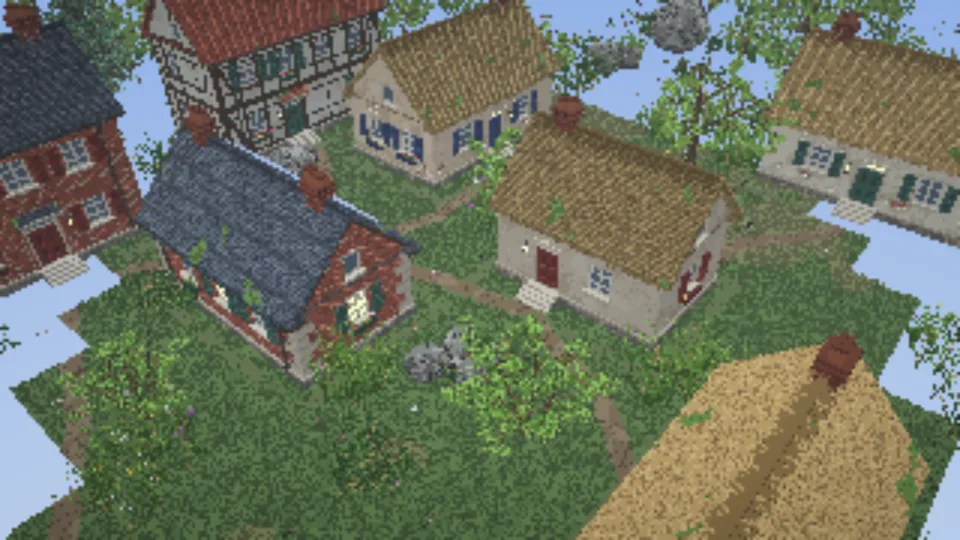
The same valley as the world (terrain, river, village, footpaths,
forest, from the same world/layout.ts), at a finer voxel size. A desktop gets five times the
resolution by default: 2 cm voxels, so single leaves and needles, bark furrows, bricks, roof
tiles and mortar at their real size. A phone gets twice: 5 cm voxels. ?vpm=100, or the scale
button in the HUD on a desktop, makes it ten times: 1 cm voxels. At the default valley size that
is a 128 m valley of 6,400 × 960 × 6,400 voxels at 2 cm (12,800 × 1,920 × 12,800 at 1 cm), which
does not fit in memory at once, so the ground streams in around the view. At 1 cm, rats at
their real size roam the village.
What it shows
- Finer models from the same designs. Every model is generated with
ctx: { voxelsPerMetre: 50 }(or 20, or 100) on the generator workers; the generators refine their coarse design rather than generating natively at 5, 2 or 1 cm. The results are sparse models (8³ bricks). At 20, brick courses and roof rows are drawn at about twice their real size (see at 20 voxels per metre). See Scales and refinement. - Instances.
makeInstanceLayeruploads each model once and places it by reference, at the layout's exact orientation (orientationYaw) and at fractional positions. Nothing is written into the world, and each species, even each house, has a palette of its own (layer.palettes.of), outside the world's 256 slots. - Coarse first, one swap, on desktops. At 50 and 100 voxels per metre a desktop shows the valley first with every
model built at the generators' native 10 voxels per metre and drawn 5 or 10 times enlarged
(
EntityPlacement.scale). The fine models are generated, encoded and baked behind it, and swapped in at once, in one frame, when their bake applies; the coarse models are released after (coarse first, one swap). It is an optional routine, and the page's choice: aCOARSE_FIRST = { desktop: true, phone: false }switch at the top ofmain.ts. The first picture comes much sooner, but a second generation, upload and bake then runs in the scene. Phones load one stage (on a phone the background stage lagged), and so does 20 voxels per metre, where a second stage would only add work.?coarse=0or?coarse=1overrides the switch. The rats are never coarse: scaled models cannot be posed. - Streamed fine terrain, filled on workers.
refineTerrainturns the coarse terrain into a smooth 5, 2 or 1 cm surface with grass blades and pebbles, streamed by amakeChunkedWorldof 256-voxel chunks. Its bricks are filled on up to six workers (ground on workers), one box per brick column (columnBoxesoverFineTerrain.columnSpan), and the main thread only copies them in, about 10 ms a chunk at 100 voxels per metre against 50 to 57 before (measured). The height map is sampled in bands on workers too, while the models generate. - The ground near the view first. The first picture waits for the ground within 18 m of the
view (
?near=, throughwhenReady), and the rest of the streamed radius comes in after it, nearest first. - An instanced crowd, at real size only.
makeCrowd({ instances })draws each rat pose as an instance, so rats glide and turn smoothly. The page builds rats only where gen-creature'srealSizeAtholds for every kind: by default only at 100 voxels per metre. Below about 84 a rat's legs would be under two voxels thick at its real size, so it would have to be built larger than life (0.86 m long at 50, 2.15 m at 20). The page leaves them out and the HUD says "rats at 1 cm".?rats=Nforces a crowd at any scale, larger than life below 100. - A phone profile. A touch-only pointer, or a GPU whose storage bindings are under 512 MiB,
gets a lighter valley: 5 cm voxels (20 per metre), a 2 × 2 tile map, one model per species, a
16 m streamed radius, the Low quality preset, rats (20) only at 100, and one loading stage: the fine models before the first picture, with no coarse stage.
?fullgives a phone the desktop settings. - A model cache. Production builds keep the generated models in IndexedDB, keyed by the worker's hashed URL, so a second visit loads in seconds and a new build never reads an old model.
- A scene cache. Beside it, the scene worker
keeps the models' encodings (by
pool.modelKey, so a hit sends no bricks) and the static set's bakes, both stages', uncompressed, under a 2.5 GiB cap sized for every example page at every scale: 17 MB at 20 voxels per metre, 177 MB at 50 and 824 MB at 100 (measured). Production builds only. - Loading off the main thread. The static scenery's models are encoded and the set baked on a scene worker, and the main thread only adds the encoded models, a few per frame, while the ground streams in. The pipelines compile behind the loading screen (
prepare), both the scaled variant for the coarse stage and the plain one for after the swap. Measured on a real GPU with a warm model cache, the longest main-thread task from the upload to the first frame went from 4.15 s to 74 ms at 100 voxels per metre, and from 0.85 s to 76 ms at 50, when the scene worker came in. - What the load takes now. Measured on a real GPU in desktop Chrome, a warm visit's first frame is 1.4 s at 50 voxels per metre and 2.5 s at 100, against 4.9 s and 13.6 s with the model cache alone and 3.1 s and 6.4 s with the scene cache as well (what it gave the examples). Most of it is the 18 m of ground the first picture waits for.
- Load progress. One load tracker collects the renderer, the generator workers, the instance layer, the streamed ground and the page's own steps; the loading screen shows the steps the page lists while it loads, and
?perfalso logs the load timeline to the console. With the coarse stage (a desktop at 50 and 100) the rows before the first picture are the coarse stage's ("Generating coarse models", "Uploading coarse models", "Placing instances"), and the fine stage follows in the corner pill as "Generating detail", "Uploading detail" and "Placing detail", beside the ground still streaming. The timeline files the fine stage under phases of its own (fine.models,fine.upload,fine.placement) and marksfinewhen the swap has applied.
The interesting part
Scenery is a list of spots, built from the shared layout and scaled by K, the factor over the
world page's 10 voxels per metre. Each stage places its own models on the same spots: the coarse
stage with scale: KC (5 or 10), the fine one at scale 1.
valley.scatter(0, 0, COARSE.x - 1, COARSE.z - 1, (pt) => {
  const { yaw, mirror } = orientationYaw(pt.variant.orientation);
  const x = pt.x * K, z = pt.z * K;
  spots.push({ key: pt.key, variant: pt.variant.index, x, y: ground.heightAt(x + K / 2, z + K / 2) + 1, z, yaw, mirror, base: baseOf(pt.key) });
  // ...
}, false);

/** The static set for one stage's models, drawn `scale` times enlarged. */
const statics = (models: Map<string, Entity[]>, scale: number) => spots.map(({ key, variant, ...s }) => {
  const list = models.get(key)!;
  return { ...s, model: list[variant % list.length].model, scale };
});
layer.setStatic(statics(first, KC));
const placed = commitStatic(layer);
// ...after the first picture, once the fine models and the plain pipeline are ready:
await swapToFine(staged, layer, statics(models, 1)); // setStatic + commitAsync in one task
The ground is filled on workers from the levelled terrain and the paths as data, a brick column at a time, each box only as tall as that column needs, and the first picture waits for the ground near the view:
const ground = refineTerrain(terrain, K, { seed });
const fill = groundFill({ fine: fineTerrainInit(ground, topOverride), base: terrainBase }); // makeChunkFillPool
const world = makeChunkedWorld({
  target: renderer,
  size: SIZE,
  chunk: CHUNK,
  seed,
  load,
  fill,
  boxes: ({ box }) => columnBoxes(box, (ox, oz) => ground.columnSpan(ox, oz)),
  generate() {
    built++; // runs once a chunk's bricks are in
  },
});
world.focus(start[0], start[1], RADIUS, RADIUS * 1.3);
// ...
await buildAround(world, focusX, focusZ, Math.min(RADIUS, NEAR + CHUNK * Math.SQRT1_2), 40); // whenReady + stepgroundFill, buildAround and swapToFine are the examples' own helpers, in
shared/ground.ts and
shared/detail.ts.
A light haze whatever the weather hides the streamed edge at the horizon, and the zoom limit keeps the camera inside it.
Controls
As on the world: drag to turn, right-drag or two fingers to pan, wheel or pinch to zoom, drag the lamp, double-tap to drop it, N for night and day, W for the weather. The button in the HUD steps between the device's default scale and one finer: 2 cm and 1 cm on a desktop, 5 cm and 2 cm on a phone ("Switch to 1 cm", "Switch to 2 cm", ...). From any other scale it goes back to the default. It reloads the page, since every model is generated for its scale, and keeps every other URL option. The HUD title names the voxel size.
URL options
| option | default (phone) | effect |
|---|---|---|
?full | desktop settings on a phone | |
?vpm= | 50 (20) | voxels per metre: 20, 50 or 100; anything else snaps to the nearest (the HUD's scale button) |
?scale= | 4 (2) | valley size in 320-voxel tiles of the world page, 1 to 8 |
?variants= | 3 (1) | models per species, 1 to 10; 10 matches the world page exactly but needs over a gigabyte of GPU memory |
?rats= | 60 (20) at 100, else none | rats in the crowd, 0 to 400; a number forces a crowd at any scale, larger than life below 100 |
?radius= | 24 (16) | streamed radius, in metres (at least 8) |
?near= | 18 | metres of ground around the view the first picture waits for (at most the radius); less is sooner, with holes at the edge of the first view |
?coarse= | on for a desktop at 50 and 100, off on a phone | 0: no coarse stage, the fine models before the first picture; 1: a coarse stage at any scale above 10 and on a phone |
?seed= | voxolith | a different valley |
?season= | summer | spring, summer, autumn, winter |
?time=night | start at midnight by the lamp | |
?weather= | clear | any ATMOSPHERES name |
?rigged | pose the rats on the GPU instead of baking poses (posed on the GPU) |
Plus the common ones.
Cost
Measured on a desktop Radeon with the desktop settings, the valley holds about 19 MB of GPU memory at 20 voxels per metre, 126 MB at 50 and 560 MB at 100. See Big worlds on phones if it will not start.
See also Instances, Streaming and Mobile and PWA.
world
A whole generated valley: gen-terrain ground and river, a village laid out on levelled pads, a forest, a lamp to carry, day and night, and weather.
nightwood
A first-person night in a misty forest at 20, 50 or 100 voxels per metre: moonlight, a cottage with lit windows through the trees, fireflies, fog as the view distance, and a coarse-first load that is up in about a second.