 voxolith
temporal
A small moonlit scene with a one-tap toggle for the renderer's temporal accumulation of shadows and AO, and a readout of what a frame costs with it off and on.
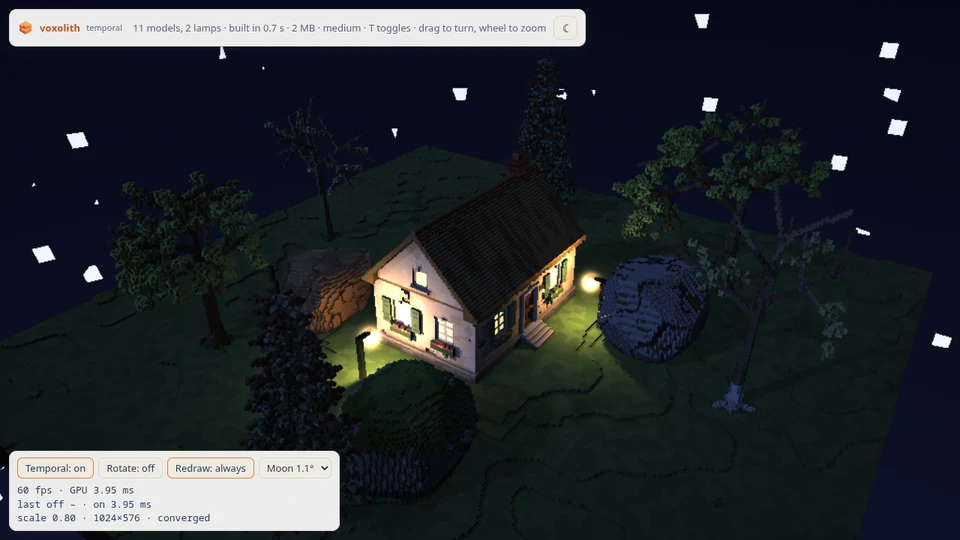
A 32 m patch of low hills at 10 voxels per metre, at night: a cottage with its windows lit, six trees, four rocks and two lamps on arms. The moon is the key light, low enough that its shadows fall across the ground, and each lamp hangs a shadowed point light off its arm, so the pole, the props and the cottage corner cast shadows into its pool. The scene builds in under a second, so the page suits a phone.
The page is for judging temporal accumulation
(RenderQuality.temporal): how it looks, and what it saves. One tap turns it off and on.
The stars currently draw as large squares: a known renderer bug, being fixed.
What it shows
- Temporal accumulation. With it on, the renderer keeps the moon's shadow, the AO and the lamps' shadows per pixel across frames, and stops tracing them once they have converged. A converged still view costs little more than its primary rays.
- Soft shadows. With temporal on, the key light is jittered within its angular radius
(
FrameParams.lightAngle), so moon shadows get soft edges that widen with the distance to the caster. The Moon select sets that radius. Without temporal, shadows are hard. - Converging on demand. The page renders on demand. With temporal on, a still view keeps
drawing until the history has converged, then stops:
makeFrameLoop({ converging })asksrenderer.converging()after each frame. - Kernels compiled ahead. The page compiles the pipelines for its starting mode behind the loading screen with
prepare, and, when it starts with accumulation off, the temporal kernels in the background after the first picture, so the first toggle does not stall (a toggle before they are ready compiles synchronously, as withoutprepare). - A fixed render scale. There is no adaptive scaling, so the numbers from one run compare with the next.
renderer.setQuality({ ...QUALITY_PRESETS.medium, temporal: true });
const loop = makeFrameLoop({
  render: () => renderer.render({ ...camera(/* ... */), ...sky, lightAngle }),
  converging: () => renderer.converging(),
});
Reading the readout
The readout under the buttons has three lines:
- fps, counted over the frames actually drawn in the last second ("idle" when nothing is drawing), and the GPU time per frame from timestamp queries, where the device has them.
last off … · on …: the last settled GPU time seen with temporal off and with it on. Opening the page and each toggle draw a burst of 40 frames, so each mode's time settles and is kept. One tap therefore gives a side-by-side comparison.- The render scale, the canvas size, and the history's state:
history off,converging…orconverged.
A converged still view with temporal on stops drawing, so its fps reads "idle" and its GPU time holds its last value. To read what a still frame costs once converged, set Redraw: always: the page then draws every frame, and the GPU time is the per-frame cost. Rotate turns the camera slowly, for the cost of a moving view.
Controls
- Drag to turn, wheel or pinch to zoom, right-drag (or two fingers) to pan.
- Temporal (or T): accumulation off and on. It reads "n/a" on the Low preset, which has no shadows or AO to accumulate.
- Rotate: the camera turns by itself.
- Redraw: always, or on demand.
- Moon: the key light's angular radius, 0.3° to 5.7°.
URL options
| option | default (phone) | effect |
|---|---|---|
?temporal=1 | off | open with temporal accumulation on |
?rotate | open auto-rotating | |
?always | open redrawing every frame | |
?renderScale= | 0.8 (0.5) | fixed render scale, 0.1 to 1; 0.3 on a CPU adapter |
?quality= | medium | low, medium or high; low on a CPU adapter, where temporal has nothing to accumulate (pass ?quality=medium to exercise it there) |
?angle= | 0.02 | the moon's angular radius in radians |
?time= | 0.1 | time of day, 0 midnight to 0.5 noon; 0.1 is night with the moon 34° up, 0.98 is nightwood's higher moon, and by day the sun and sky are the engine's own |
?ambient= | 1 | sky light, as a multiple of the engine's own for that time; lower gives darker shadows |
?yaw= | 305 | the camera's starting heading in degrees |
?show=1, ?show=2 | the renderer's development views: tiles traced, samples per pixel | |
?seed= | temporal | a different layout |
?full | desktop settings on a phone | |
?e2e | window.temporalStats() and window.temporalSet({ temporal, rotate, always, angle }) |
Plus the common ones.
Phones
A phone (a touch-only pointer, or storage bindings under 512 MiB) gets the Medium preset at render scale 0.5; a desktop gets Medium at 0.8. A CPU adapter starts on Low at render scale 0.3, where temporal reads "n/a".
Measured
On a desktop Radeon at 1280 × 720, render scale 0.8, drawing every frame (Redraw: always), GPU ms per frame with temporal off → on:
| view | off | on |
|---|---|---|
| still | 6.2 | 4.2 |
| rotating slowly | 6.3 | 4.2 |
| still, render scale 0.5 | 4.0 | 2.2 |
A slow turn keeps most of the saving because a pixel that still sees the same face keeps its history. A fast spin, or a crowd moving over the whole view, saves much less; see what it costs.
See also Performance, Lighting and the nightwood example.
nightwood
A first-person night in a misty forest at 20, 50 or 100 voxels per metre: moonlight, a cottage with lit windows through the trees, fireflies, fog as the view distance, and a coarse-first load that is up in about a second.
creature
Rigged, animated rats from gen-creature, baked through a pose cache and stamped with makeBrickStamper. Tap one to wound it, tap again to take a limb off.