 voxolith
nightwood
A first-person night in a misty forest at 20, 50 or 100 voxels per metre: moonlight, a cottage with lit windows through the trees, fireflies, fog as the view distance, and a coarse-first load that is up in about a second.
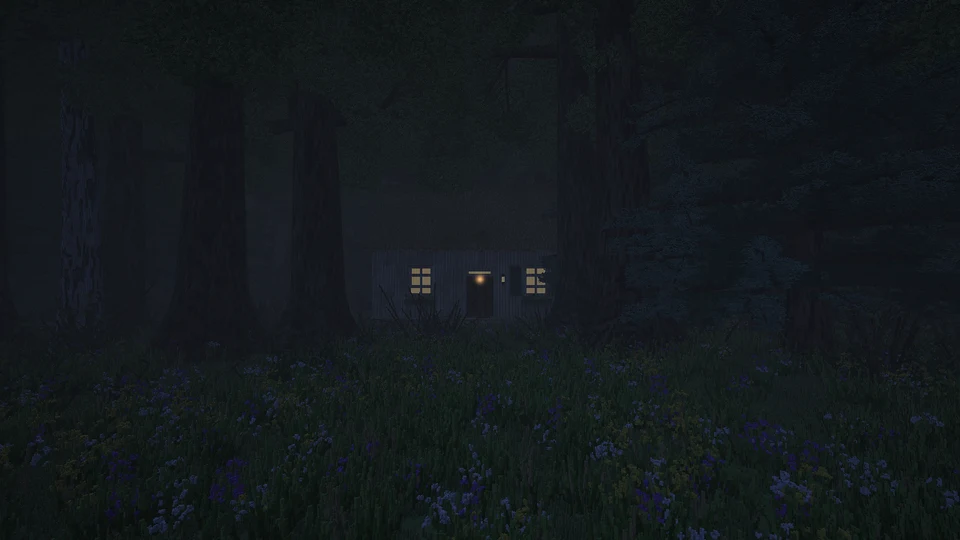
You stand in a clearing in a dense, misty wood at night. Oak, birch and spruce close in on every side, bushes, bracken and grass grow underneath, and through a gap in the trees a cottage has its windows lit and a lantern at the door. Fireflies drift between the trunks. You can look around but not walk. The camera stands still, so the world only has to reach as far as the fog lets you see. The lighting is the point of the page, and the renderer's work on lighting is measured against it: temporal accumulation nearly halves its frame at a fixed view (the page leaves it off; the temporal example has the toggle), and world-space light comes next.
What it shows
- 5, 2 or 1 cm voxels close up. Every model is generated at 50 voxels per metre by default on a desktop and 20 on a phone (a touch-only pointer, or storage bindings under 512 MiB), or one scale finer with the HUD's scale button (which reloads the scene), on the generator workers (the world page's worker, with its model cache in production builds) and drawn as instances: about 250 trees, 850 shrubs and 900 plants from 12 models. See Scales and refinement.
- Mist. The weather is the engine's
fogpreset (ATMOSPHERES) throughatmosphereFrame, thinning with height, recoloured to a pale moonlit grey: the night horizon it would take is almost black and reads as darkness, not mist. The lamps glow through it. - Fog as the view distance.
fog.distancestops every primary ray at 24 m and closes the fog over its last quarter, so nothing past it is traced and the edge of the 60 m world never shows. - Moonlight. The key light is the moon of
timeOfDay(0.98), brightened and turned bluer. It shadows through the canopy, so only the clearing is moonlit. - Point lights. The lantern is a shadowed point light with a halo. Each firefly is a small unshadowed one with a halo, wandering its own slow path and pulsing, up to 28 of the renderer's 32 lights. The window glass is emissive, which lights only itself (see Lighting).
- Crowded instance cells. Canopies overlap, so at 100 voxels per metre each 64³ cell of the wood lists about 20 instances. The renderer splits those lists by 16³ sub-cell, listing only the instances whose voxels can be there (see crowded cells). The first, looser tables made this page about 8 times faster at 100 voxels per metre than walking whole lists; marking them from what each model actually draws took another 29 to 47% off a frame, more at finer scales. The price is build time while the scene is placed: about 0.65 s at 20 voxels per metre, 5 s at 50 and 20 s at 100, which this page spends on a worker (below).
- Coarse first, one swap, on desktops. At 50 and 100 voxels per metre a desktop shows the wood first with every model built at the generators' native 10 voxels per metre and drawn 5 or 10 times enlarged (
EntityPlacement.scale); the fine models are generated, encoded and baked behind it and swapped in at once, in one frame, when their bake applies, and the coarse models are released after (coarse first, one swap). Coarse undergrowth is denser than the fine, so it visibly thins at the swap. It is an optional routine and the page's choice, aCOARSE_FIRST = { desktop: true, phone: false }switch at the top ofmain.ts: the first picture comes much sooner, but a second generation, upload and bake then runs in the scene. Phones load one stage (on a phone the background stage lagged), and so does 20 voxels per metre;?coarse=0or?coarse=1overrides the switch. - Ground filled on workers, and only the ground you see first. The forest floor is streamed in 256-voxel chunks whose bricks are filled on up to six workers, one box per brick column (ground on workers); the main thread only copies them in. The first picture waits for the ground within 8 m of the camera (
?near=): the camera stands still and the fog and undergrowth hide the rest, and with streaming stopped at the first picture 6 m left holes in the fog at 100 voxels per metre and 8 m none (checked). The rest of the reach streams in after it. - Loading off the main thread. The forest's models are encoded and its static set baked on a scene worker while the ground builds; the main thread only adds the encoded models, a few per frame. The pipelines compile behind the loading screen (
prepare), the scaled variant for the coarse stage and the plain one for after the swap. Measured on a real GPU with a warm model cache, the longest main-thread task from the upload to the first frame went from 3.43 s to 168 ms at 100 voxels per metre (that task comes during the bake), and from 0.76 s to 78 ms at 50, when the scene worker came in. - A scene cache. Production builds keep the forest's encodings (by
pool.modelKey, so a hit sends no bricks) and its bakes, both stages', in IndexedDB beside the model cache (caching encodings and bakes): 13 MB at 20 voxels per metre, 129 MB at 50 and 655 MB at 100, uncompressed, under a 2.5 GiB cap sized for every example page at every scale (measured). The generator workers post each model as one packed buffer, which took the warmmodelsphase at 100 from 7.4 s to 0.28 s. - What the load takes now. Measured on a real GPU in desktop Chrome, a warm visit's first frame is 0.5 s at 50 voxels per metre and 1.0 s at 100, against 6.6 s and 30.8 s with the model cache alone and 3.7 s and 13.9 s with the scene cache as well (what it gave the examples).
- Load progress. One load tracker collects the renderer, the generator workers, the instance layer, the streamed ground and the page's own steps; the loading screen shows the steps the page lists while it loads, and
?perfalso logs the load timeline to the console. With the coarse stage (a desktop at 50 and 100) the rows before the first picture are the coarse stage's ("Generating coarse models", "Uploading coarse models", "Placing instances"), and the corner pill then shows "Generating detail", "Uploading detail" and "Placing detail" beside the ground still streaming. The timeline files the fine stage underfine.models,fine.uploadandfine.placement, and marksfineat the swap.
The interesting part
The view distance is one field of the fog, and the fireflies are ordinary point lights, rebuilt every frame:
const fog = { density: 1.2 / m(30), color: [0.025, 0.035, 0.06] as Vec3, heightFalloff: 0, distance: m(VIEW) };

const lights = (t: number): PointLight[] => [
  { position: lantern, color: [1.0, 0.66, 0.34], intensity: 2.4, range: m(11), glow: m(0.12) },
  ...flies
    .filter((f) => pulse(f, t) > 0.02)
    .map((f): PointLight => ({
      position: wander(f, t),
      color: [0.78, 1.0, 0.36],
      intensity: 0.9 * pulse(f, t),
      range: m(2.2),
      shadows: false,
      glow: m(0.035),
    })),
];
The ground is filled on workers and the first picture waits only for what is near the camera:
const ground = refineTerrain(terrain, K, { seed });
const fill = groundFill({ fine: fineTerrainInit(ground), base: groundBase }); // makeChunkFillPool
const world = makeChunkedWorld({
  target: renderer,
  size: SIZE,
  chunk: CHUNK,
  seed,
  load,
  fill,
  boxes: ({ box }) => columnBoxes(box, (ox, oz) => ground.columnSpan(ox, oz)),
});
world.focus(C[0], C[1], REACH, REACH * 1.2); // the workers fill it while the models generate
// ...
const NEAR = Math.min(REACH, m(Math.max(0, Math.min(VIEW, num("near", NEAR_M)))) + CHUNK * Math.SQRT1_2);
await buildAround(world, C[0], C[1], NEAR, 40); // whenReady, stepping 40 ms a frame meanwhile
groundFill and buildAround are the examples' own, in
shared/ground.ts.
Cost
Rays through foliage step voxel by voxel wherever an instance may be, and each step transforms
into the instances there. So this page is expensive, and the cost follows the voxel size. At
1280 × 720 on a desktop Radeon at render scale 1, a frame takes about 39 ms of GPU time at 20
voxels per metre against 86 ms at 50, which is why phones start at 20; the adaptive render scale
brings that down to what the device can keep up with. Phones also get 12 fireflies and the Medium
preset, and load in one stage, with no coarse models first. renderer.setDebug(10) shows the steps each ray took; ?renderScale= fixes the scale for
measuring.
Controls
Drag (or click for mouse look) to look around; Q/E turn and R/F look up and down; a gamepad's right stick works too. The button in the HUD steps between the device's default scale and one finer: 2 cm and 1 cm on a desktop, 5 cm and 2 cm on a phone. From any other scale it goes back to the default. It reloads the page and keeps every other URL option. The HUD title names the voxel size.
URL options
| option | default (phone) | effect |
|---|---|---|
?full | desktop settings on a phone | |
?vpm= | 50 (20) | voxels per metre: 20, 50 or 100; anything else snaps to the nearest (the HUD's scale button) |
?near= | 8 | metres of ground around the camera the first picture waits for; 6 left holes in the fog at 100 |
?coarse= | on for a desktop at 50 and 100, off on a phone | 0: no coarse stage, the fine models before the first picture; 1: a coarse stage at any scale above 10 and on a phone |
?weather= | fog | any ATMOSPHERES name; clear for no mist |
?mist= | 0.8 | the weather's fog thickness, times the engine's |
?view= | 24 | view distance in metres, 8 to 40 |
?fireflies= | 24 (12) | fireflies, 0 to 28 |
?trees=, ?shrubs=, ?plants= | 1 | density of each, 0 to 1 |
?seed= | nightwood | a different wood |
?renderScale= | adaptive | a fixed render scale, for measuring |
Plus the common ones.
See also Instances, Lighting and Atmosphere and weather.
valley
The world valley at 20, 50 or 100 voxels per metre: coarse models first and one swap to the refined ones, drawn as instances, ground streamed in chunks filled on workers, rats at their real size and a lighter phone profile.
temporal
A small moonlit scene with a one-tap toggle for the renderer's temporal accumulation of shadows and AO, and a readout of what a frame costs with it off and on.